Check, review and fix your thesis against your university's own Word template — entirely on your computer. APA, MLA, Chicago and IEEE built in.
Your thesis never leaves your computer. Everything — reading the template, checking the document, applying fixes — happens locally. No upload, no cloud processing, no waiting in a queue.
No editions to choose between — PaperFormat Pro includes the full toolkit.
Check your own thesis or a whole cohort at once. Read a plain-language report of every issue, then fix them in one click — or export an annotated copy and review each change yourself.
Three steps, and the rules come from your school — not from us.
Point the app at your document and, if you have one, your university's Word template. It reads the template's rules into a profile.
You get a plain-language list of everything that was flagged, and what should be changed. Nothing is modified until you say so.
Apply the fixes in one click, or keep your original untouched and export an annotated copy with a note on every change.
Your template is the standard — the app measures your document against it, item by item.
Original thesis on the left, corrected version on the right — every change carries a comment explaining what changed and why.
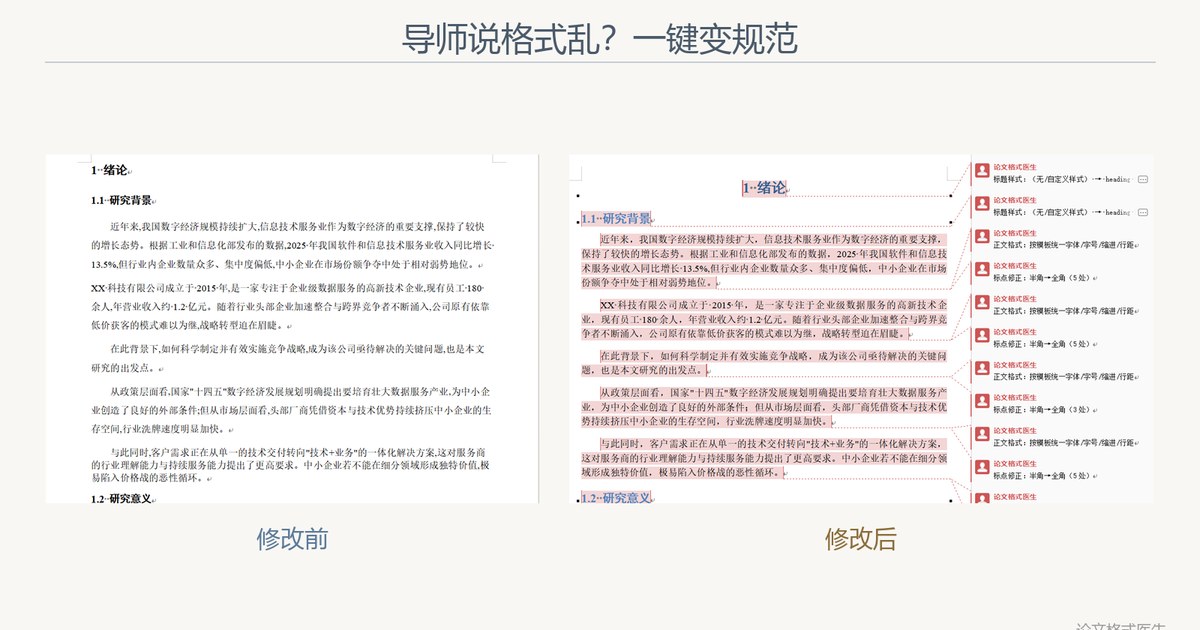
"Example University" in the screenshot is a fictional demo template. Upload your own university's template and the app follows your school's requirements.
No. The desktop app reads, checks and fixes your document entirely on your own computer. Your file is never uploaded to any server.
The app builds its rules from the Word template you supply, so it follows your university rather than a fixed preset. It also ships presets for APA, MLA, Chicago and IEEE.
No. It changes formatting only — fonts, sizes, margins, spacing, heading levels and reference layout. Your words are left exactly as they are.
Windows, macOS and Linux.
Purchase on this site (we use Paddle as the Merchant of Record, so taxes are handled for you). You receive an activation code, which you enter in the app following the activation guide.
Yes. Download the app and run a full format check for free. Payment is only required to apply the fixes.
Download the app, run it on your own thesis, and see the report before you decide anything.
Download free trial PaperFormat Pro